Skip to content
CMS SEO services

CMS SEO Services – Rank on Google & AI Search

Every website platform has its own strengths and its own SEO traps. WordPress, Webflow, Wix and Squarespace each handle titles, URLs, speed and structured data differently. I plan and handle the SEO personally, using what your platform does well and working around what it does not.

4.9/5 from 81 reviews · Platform-specific, hands-on

Get a free first look

Send your website. I will reply myself with what I see and what I would fix first.

or

Chat on WhatsApp
8+ Years of SEO experience
1,200+ Projects delivered
21+ Countries served
4.9/5 From 81 reviews
What it is

What CMS SEO is, and why the platform matters

A CMS, or content management system, is the tool your website is built and edited in. CMS SEO is SEO that takes that tool into account: what it lets you control, what it decides for you and where it quietly causes problems.

Two sites with identical content can perform very differently because of the platform. One lets you edit every title and redirect in a minute. Another hides the setting, or adds a duplicate page for every tag. One loads fast by default. Another needs work to keep pages light.

A CMS SEO expert knows these differences before opening the site. The advice is concrete: which setting to change, which plugin or app to remove, which template to edit.

The same core work applies on every platform: a sound technical SEO base, pages tuned through on-page SEO, and content planned from keyword research. The platform decides how each of those is done.

At a glance

How the main platforms differ for SEO

A simplified view. Every site is different, so treat this as a starting point.

Feature Control over the code What to watch
WordPress Very high Plugins and hosting quality
Webflow High Heading structure and script weight
Wix Medium Heavy elements and apps
Squarespace Lower Fixed templates and limited technical settings
Weebly Lower Limited code access and heavy themes
Framer Medium Heading order
HubSpot CMS High Landing pages
Next.js and headless Very high Rendering
By platform

CMS SEO for the platform you use

Pick your platform to see the specific problems I fix and how I work.

WordPress

The most flexible platform, and the one where plugins, hosting and theme choices matter most.

WordPress SEO expert →

Webflow

Clean design control with SEO settings that need setting up properly and a heading structure that needs care.

Webflow SEO expert →

Wix

An all-in-one builder with real SEO tools, and limits on speed and technical control to work around.

Wix SEO expert →

Squarespace

Polished templates and a simple setup, with fewer technical controls and some fixed behaviours to manage.

Squarespace SEO expert →

Weebly

A simple builder with the basics in place and limited technical control, so page work and speed matter most.

Weebly SEO expert →

Framer

Fast, polished sites where heading order, effects and CMS metadata need care.

Framer SEO expert →

HubSpot CMS

A site tied to your marketing, where landing pages, blog archives and domains need clear rules.

HubSpot CMS SEO expert →

Next.js and headless

Rendering, metadata, routes and speed on JavaScript sites, so crawlers and AI tools can read them.

Next.js SEO expert →
Other platforms

Online stores and other systems

If you sell online, your platform has its own page under ecommerce SEO, including Shopify SEO and WooCommerce SEO. Sites on Drupal, Joomla, Ghost or a custom build are welcome too. Message me with the address and I will tell you honestly how I would approach it.

Wondering whether to change platform at all? That is a big decision, and one I would only recommend for good reasons. If you do move, a careful site migration protects the rankings you have.

My process

How a CMS SEO project runs

1

Identify the platform and its limits

What can be changed in settings, what needs code, and what is simply not possible on your plan.

2

Crawl and review

I crawl the site, read Search Console and see it the way Google does.

3

Fix the foundation

Structure, speed, duplicates, redirects and markup, in order of return.

4

Map and rework pages

Each page gets one clear target. Titles, headings, copy and links are rebuilt around it.

5

Report every month

Clicks, rankings and enquiries, with plain next steps.

Results

Results on different platforms

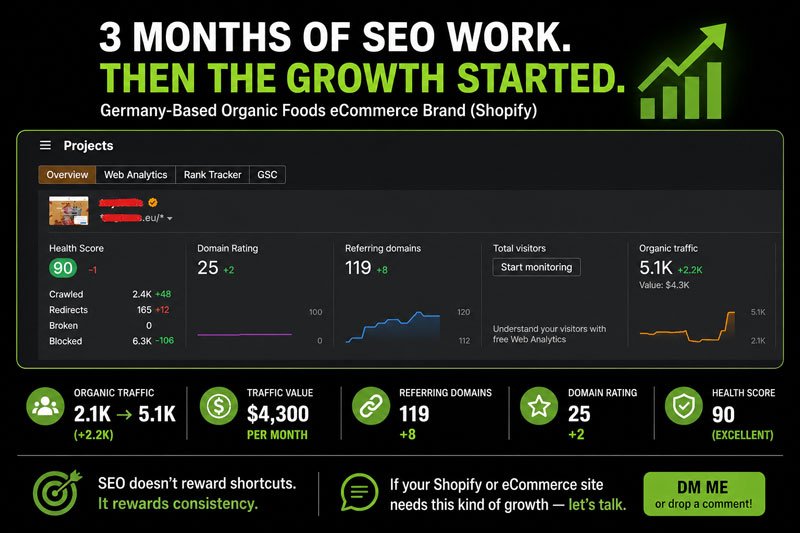
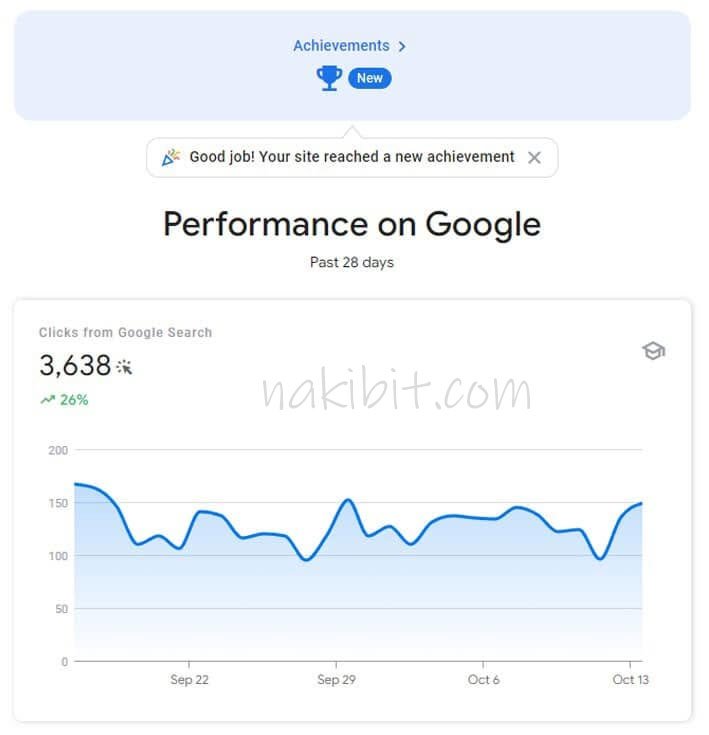
Results from a WordPress store and a Shopify store. The method is the same on every platform.

❓ Common Questions

CMS SEO questions, answered plainly

What is CMS SEO?
It is search engine optimisation that takes your website platform into account. It uses what the platform does well, fixes what it does badly and avoids the settings and plugins that cause problems.
None is best for every site. WordPress offers the most control. Webflow gives clean code and design freedom. Wix and Squarespace are simpler and work well for many small businesses. The right choice depends on your needs and who maintains the site.
Yes. Plenty of sites on both platforms rank. They have fewer technical controls, so the focus shifts to content, structure and links, which matter most anyway.
Rarely. Most SEO problems can be fixed where you are. A move can cost rankings if it is not planned, so I only recommend it when the platform is truly the blocker.
Yes, as well as custom builds. Message me with the address and I will tell you how I would approach it.
No. Nobody honestly can. I show you what I am changing and why, and report clicks, rankings and enquiries every month.
Nazirul Islam Nakib

Handled personally by

Nazirul Islam Nakib

Professional SEO Expert · Google, HubSpot and Semrush certified

8+ years and 1,200+ projects for clients in 21+ countries. You deal with me directly, from the first audit to the last report. More about me.

Free site review

Send me your website and I will tell you what I see

Share the address and your platform. I will tell you what is holding it back and what I would fix first.

No obligation · Reply from Nazirul Islam Nakib himself

Nazirul Islam Nakib Nazirul Islam Nakib