Filter and sort URLs
Parameters for sorting, filtering and price ranges can create endless near-duplicate pages. I control which ones Google crawls and indexes.
I am Nazirul Islam Nakib, a professional WooCommerce SEO expert, SEO consultant and SEO strategist. WooCommerce gives you total control, which also means total responsibility. Filters, plugins, variations and hosting all affect how Google sees your store. I tidy the foundation and rebuild the pages that earn orders, so your WordPress shop ranks without a pile of plugins holding it up.
4.9/5 from 81 reviews · Hands-on, store by store

Get a free first look
Send your website. I will reply myself with what I see and what I would fix first.
or
Chat on WhatsAppWooCommerce SEO is SEO for a store built on WordPress with the WooCommerce plugin. Its strength is flexibility. You choose your hosting, theme, SEO plugin and structure. The cost is that every choice can help or hurt.
A WooCommerce SEO expert checks the things the plugin leaves to you: how filters and sorting create URLs, which pages should not be indexed, how products and categories are addressed, how variations are handled, and how much your plugins and theme slow the shop.
Most WooCommerce stores I look at have good products and a tangled setup. Tidying it gives Google a clearer picture and shoppers a faster page.
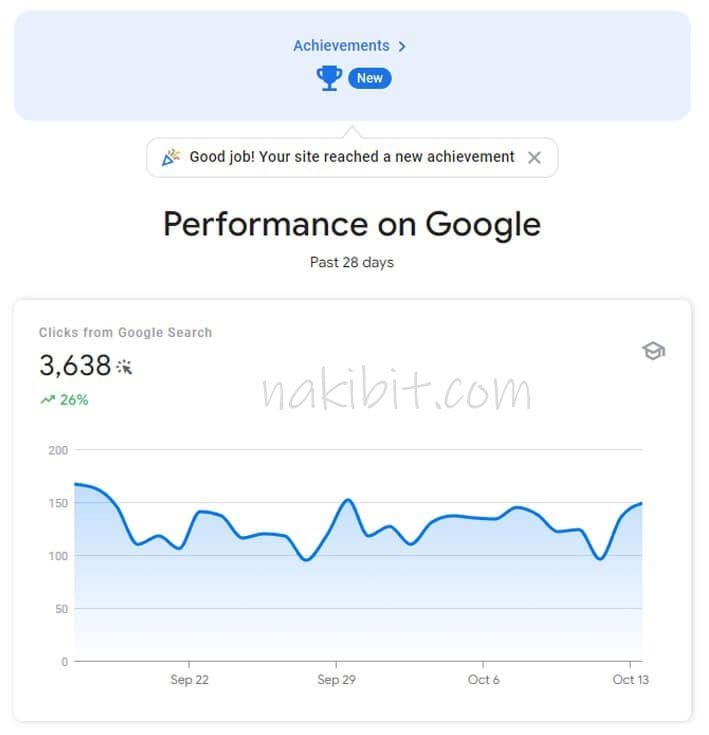
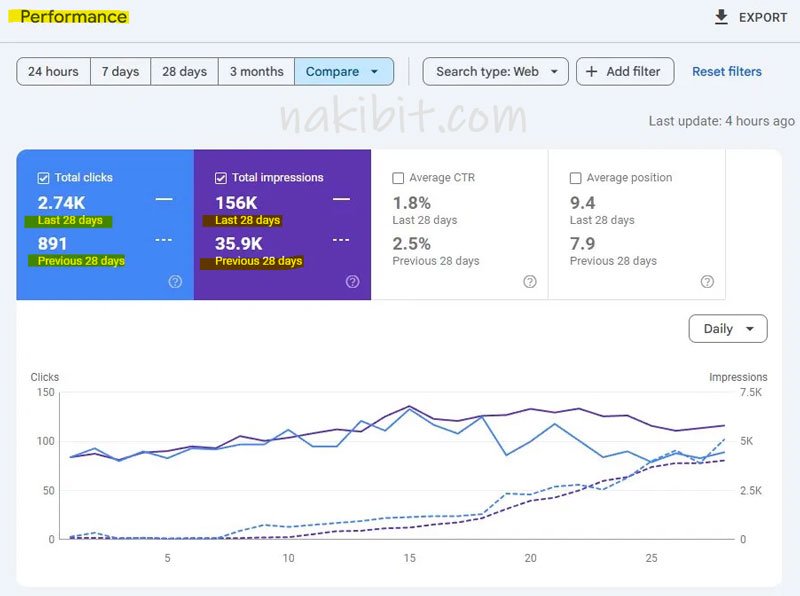
On a WordPress gadget store in Bangladesh, technical and on-page work reached 3,638 clicks in 28 days and 50 keywords in the top five by month five. See the case studies. The overall approach is on my ecommerce SEO page.
Parameters for sorting, filtering and price ranges can create endless near-duplicate pages. I control which ones Google crawls and indexes.
Cart, checkout and account pages should not appear in search. I check they are handled and not wasting crawl time.
The base of your product and category addresses is a one-time decision. I review it, and plan redirects if a change is truly needed.
Variations can spawn thin duplicates or hide useful options. I decide what lives on one page and what needs its own.
Hosting, page builders and plugin count decide how fast your shop loads. I find what to remove, replace or cache without breaking the cart.
WooCommerce, your SEO plugin and a reviews plugin can all output product data. I make sure the result is one clean, accurate version.
Keep the page, redirect it or retire it. Each case gets the right treatment, so you do not lose rankings or send shoppers to dead ends.
Yoast, Rank Math or similar, configured for products, categories and archives, with templates that scale.
Both run the same plugin. The setup is what differs.
I review the theme, plugins and Search Console to find what slows the store or creates thin and duplicate pages.
Filter URLs, product variations, caching and image weight, the usual WooCommerce weak spots.
One clear target for each category and key product.
Descriptions, headings, internal links and structured data reworked for shoppers.
Clicks, rankings and orders by month, with what I am changing next.
Results from WordPress and other ecommerce stores, using the same method.
 WordPress ecommerce
Gadget store, Bangladesh
Technical and on-page work on WordPress, local-language search behaviour, and optimisation for Bing and AI platforms.
 Ecommerce
Organic food store, Chicago, USA
A store that had relied on paid ads for 1.5 years. Technical fixes, schema, on-page work, then content and links.
WooCommerce stores lean on a strong base. Technical SEO clears filter and crawl problems, and Core Web Vitals work speeds up pages. Schema markup cleans up product data.
Category and product pages are covered by on-page SEO, and buying guides by content SEO. Choosing targets starts with keyword research. Changing platform or domain? Plan it as a site migration. The overview is on my ecommerce SEO page.
Choosing a WooCommerce SEO consultant is mostly a question of who touches your store. When you work with me, I audit the shop, write the plan and make or brief every change myself. I hold HubSpot and Semrush certifications and have more than eight years of experience across 1,200+ projects, so you get an independent SEO expert, not an account manager.
WooCommerce rewards someone who understands both sides: the SEO strategy and the WordPress machinery underneath it. A specialist who only knows keywords will miss a filter plugin flooding the index. A developer who only knows code will miss that three category pages target the same search. I act as the SEO strategist who connects the two, then hands your developer a short, ordered list of what to change.
If you want the wider picture first, my professional SEO services page explains how I work with every kind of site, and the ecommerce SEO overview shows how platform work fits into a full store plan.
A default WooCommerce store can generate a surprising number of URLs. Sorting options add an order parameter, attribute filters add their own parameters, price sliders add minimum and maximum values, and pagination multiplies all of it. Google can spend its crawl time on thousands of near-identical pages while your best categories wait.
I start by looking at what Google has actually crawled and indexed, using Search Console and a crawl of the store. Then I decide, template by template, which URLs deserve to be found. Usually the clean category and a handful of high-demand filtered views stay indexable, with canonical tags pointing the rest back to the main page. Sorting and layout parameters are kept out of the index, and internal links stop promoting them.
One point worth knowing: a robots.txt block stops crawling but does not remove a URL that is already known, and Google cannot see a canonical or noindex on a page it is not allowed to fetch. So the order of the fix matters. I plan it step by step and check Search Console after each change, instead of blocking everything at once.
Cart, checkout and account pages get the same care. WooCommerce usually handles these sensibly, but themes, caching plugins and multilingual setups can undo it, so I confirm they are excluded and that nothing in your navigation pushes shoppers or crawlers toward them.
Categories are where most WooCommerce stores win or lose. A shopper searching for a type of product wants a clear heading, a useful short introduction, products worth scanning and links to related ranges. Many stores ship an empty archive page with a title and a grid. I map one clear search target to each important category, write copy that helps a buyer decide, and add internal links to subcategories and buying guides.
Product pages need different work. Manufacturer descriptions copied across the web give Google no reason to prefer your page, so I rewrite the descriptions that matter most with real specifications, sizing, materials, delivery notes and answers to the questions customers actually ask. Title tags and headings follow patterns that scale through your SEO plugin, with manual attention on the products that bring the most revenue.
The structure underneath matters too. Your product and category base are set once and are costly to change later, so I only recommend changing them when the benefit is clear and I plan redirects before touching anything. Breadcrumbs, related products and in-content links are checked so that authority flows from strong pages to the ones that need it.
This is the on-page layer, and it sits alongside my on-page SEO and keyword research work for any website.
Variable products are powerful and easy to mishandle. If every colour and size becomes its own indexed page, you get thin duplicates. If everything is crammed onto one page with no visible options, you may miss searches for specific variants. I decide which attributes shoppers genuinely search for, such as a colour or a size, and treat those as worth a page or a clearly written section, while the rest stay as selectable options.
Stock status needs a policy, not a guess. A product that is out of stock for a week should usually stay live with clear messaging. A product that is gone for good may deserve a redirect to its closest replacement or its category. A seasonal item may be worth keeping and updating. I write that rule down for your team so it is applied the same way every time.
Reviews are another place where WooCommerce stores differ. Genuine customer reviews help shoppers and can support rich results, but only when the markup matches what visitors see on the page. I check that your reviews plugin, your SEO plugin and WooCommerce itself are not each outputting their own version of the same data.
Page speed on WooCommerce is rarely one big problem. It is usually hosting that is too small, a page builder adding heavy markup, a slider on the homepage, uncompressed images, and a long list of plugins each loading scripts on every page. Google measures real visitor experience through Core Web Vitals, with good scores defined as Largest Contentful Paint within 2.5 seconds, Interaction to Next Paint within 200 milliseconds and Cumulative Layout Shift below 0.1, judged at the 75th percentile of visits.
I begin with field data from Search Console and PageSpeed Insights, then test the templates that matter: home, category, product, cart and checkout. I look at what loads, in what order, and which plugin is responsible. Fixes are ranked by impact. Image sizing and formats, script loading, caching rules that do not break the basket, database cleanup and hosting limits are the usual suspects.
Some changes need a developer or a hosting move, and I say so plainly. The Core Web Vitals service covers the same method for any site, and technical SEO covers the crawl and indexing checks that go with it.
Shoppers now ask ChatGPT, Gemini, Google AI Overviews and Copilot for product recommendations, comparisons and buying advice. As an AI search specialist, I treat this as an extension of good ecommerce SEO rather than a separate trick. These systems draw on pages that are clear, accurate, crawlable and trusted, so the foundations in this page apply directly.
For WooCommerce that means product pages with complete specifications and honest descriptions, consistent product data in your markup and your feeds, comparison and buying-guide content that answers real questions in plain language, and clear information about delivery, returns and who you are. Brand mentions and reviews outside your own site help AI systems recognise your store as a real business.
No one can promise a place in an AI answer, and I do not. What I can do is make your store easy for these systems to understand and worth citing. You can read more about my approach in AI SEO and answer engine optimization.
Rankings alone do not pay for stock. I report on the things a store owner cares about: organic clicks and impressions for category and product pages, the share of crawled URLs that are useful, Core Web Vitals on your key templates, and organic orders and revenue from your analytics setup.
Before any change, I record a baseline from Search Console and analytics, so every later movement has something to be compared against. I also keep a log of what changed and when, because in ecommerce a price change, a stock problem or a seasonal spike can look like an SEO win or loss when it is neither.
The gadget store result above is the kind of evidence I mean: 3,638 clicks in 28 days on a WordPress store, shown with its context on the case study page rather than as a promise about yours.
Every project is tailored, but most include a store audit covering crawl, index, speed, structure and markup, a prioritised fix list written so your developer can act on it, a keyword map for categories and key products, rewritten copy for the pages that matter most, a plan for filters, variations and out-of-stock items, and monthly reporting on clicks and orders.
You also get a clear explanation of what I am changing and why, in plain language, so you stay in control of your own store. Most stores I work with do not need every item at once, which is why I start with a free look and a short list of what I would do first.
Whether you hire a freelance WooCommerce SEO specialist, a consultant or an agency, ask a few direct questions. Who will actually work on my store? Can you show a result on a WordPress shop, with context? How do you handle filters and variations? Will you change my plugins without asking? How will you report on orders, not only rankings?
Be careful with anyone who promises a ranking, offers a big fixed number of links, or wants to replace your whole theme before looking at the data. A good company explains trade-offs, admits what needs a developer and shows its work.
If you want to talk it through, my SEO consultant page explains how I work, and the about page tells you who I am. You can also send me your store through the contact form and I will tell you what I would fix first.
I work as a holistic SEO expert, which means technical health, content, links and reputation are planned together. Fixing only one of them rarely moves the needle, so I tell you first which one is holding you back. I also work as a programmatic SEO consultant for sites with large catalogues or many locations. The rule is simple: scale only what is genuinely useful, and keep every generated page unique, accurate and worth indexing.
As an expert SEO consultant, I would rather give you a smaller, honest plan than a big one full of filler. You see what I will do, why it matters and how we will check that it worked.
WooCommerce gives you control and a lot to tidy. The plans cover plugins, filters, product pages and speed.
Store Startup
from $199 per month
Audit, product and category fixes and technical clean-up for a smaller store.
Store Growth
from $499 per month
Up to 25 product pages, buyer-intent content and link building.
Store Authority
from $999 per month
Full catalogue strategy, digital PR and conversion-focused SEO.
See the full ecommerce SEO plans →
Starting prices in US dollars. I confirm the scope after a free look at your site, so you always know the price before any work starts.
Share the address and the category you most want to rank. I will tell you what I see and what I would fix first.
No obligation · Reply from Nazirul Islam Nakib himself
 Nazirul Islam Nakib
We usually reply in a few minutes
Leave your email or WhatsApp number and we'll follow up as soon as we're back online.