Plugin overload and conflicts
Too many plugins slow a site and clash with each other. I find what to remove, replace or keep, and avoid doubling up on SEO tools.
I am Nazirul Islam Nakib, an experienced WordPress SEO expert, SEO consultant and SEO strategist. WordPress can rank as well as any platform. It can also be slowed down by the wrong plugins, hosting and theme. I sort out the foundation, tune the pages and keep the setup light, so your site is easy for Google to read and quick for visitors.
4.9/5 from 81 reviews · Hands-on, site by site

Get a free first look
Send your website. I will reply myself with what I see and what I would fix first.
or
Chat on WhatsAppWordPress SEO is SEO for sites built on WordPress. Its big advantage is control. You decide the theme, the hosting, the plugins, the structure and the content. Its big risk is also control. Every choice, from a page builder to a free plugin, can help or hurt.
A WordPress SEO expert reviews what the platform leaves up to you: your permalink structure, which archives and tag pages should be indexed, how an SEO plugin is configured, how much your theme and plugins slow pages down, and whether your headings and markup make sense.
Many WordPress sites I see have good content and a tangled setup. Cleaning it up gives Google a clearer picture and visitors a faster page.
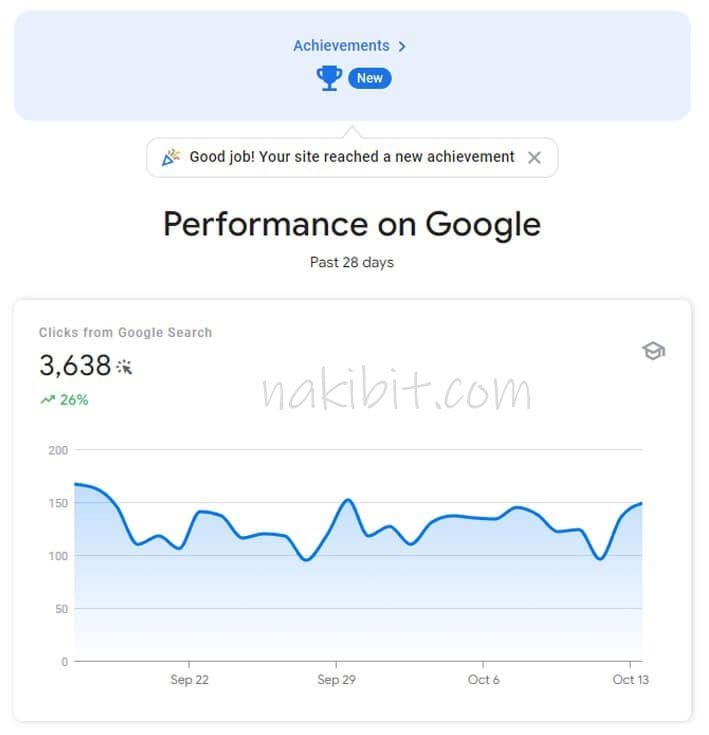
On a WordPress gadget store in Bangladesh, technical and on-page work reached 3,638 clicks in 28 days and 50 keywords in the top five by month five. See the case studies. If your WordPress site is an online shop, see WooCommerce SEO.
Too many plugins slow a site and clash with each other. I find what to remove, replace or keep, and avoid doubling up on SEO tools.
Hosting, caching, images, fonts and page builders decide how fast pages load. I find the biggest causes and fix them in order.
Clean, stable addresses and a sensible category setup. If something must change, redirects protect your rankings.
Author, date, tag and attachment pages can create near-empty duplicates. I decide which should be indexed and which should not.
Yoast, Rank Math or similar, set up properly for your content types, with titles and descriptions that scale.
Page builders can output the wrong headings or heavy code. I make sure each page has a clear outline and clean markup.
Article, Organization, Breadcrumb and other markup that matches what is on the page, without duplicates from several plugins.
Outdated themes and plugins cause outages and hacks that cost rankings. I flag what needs attention and who should handle it.
Same platform, very different results.
I review the theme, plugins and indexing settings to find what slows the site or confuses Google.
Too many plugins, heavy themes and missing caching are the usual WordPress problems, so they come first.
A clear structure of pages, categories and internal links, with one target per page.
Pages and posts rewritten to match what visitors want, with proper headings and schema.
Search Console clicks and enquiries by month, with the next steps.
Results from a WordPress ecommerce store.
 WordPress ecommerce
Gadget store, Bangladesh
Technical and on-page work on WordPress, local-language search behaviour, and optimisation for Bing and AI platforms.
WordPress is a strong base for the rest of SEO. Technical SEO clears crawl and indexing issues, and Core Web Vitals work speeds up pages. Schema markup adds clean structured data.
Content planning comes from keyword research and content SEO, and link building helps your best pages beat competitors. Changing theme, host or domain? Plan it as a site migration. The overview of all platforms is on my CMS SEO page.
WordPress powers a very large share of the web, from small business sites and blogs to shops, publications and membership sites. It is open source, flexible and supported by thousands of themes and plugins. You choose the host, the theme, the structure and the tools, and you own the site completely.
For SEO that freedom is a major advantage. You can edit anything: titles, descriptions, permalinks, redirects, robots rules, sitemaps, structured data, caching and image handling. It is also the main risk. Every plugin adds code, every page builder adds markup, every theme makes choices about headings and speed, and many sites collect years of old decisions that nobody remembers making.
So WordPress SEO is less about finding tricks and more about keeping a clean, deliberate setup. I am Nazirul Islam Nakib, a professional SEO expert, and as a WordPress SEO specialist and SEO strategist I look at the site the way a mechanic looks at an engine: what is needed, what is redundant and what is quietly causing damage. On a WordPress gadget store in Bangladesh, this kind of work reached 3,638 clicks in 28 days and 50 keywords in the top five by month five. You can read more about my work on the Nakib IT home page.
A WordPress review has a standard list, and I go through each item.
Permalinks first. A clean structure, with readable addresses that do not include dates or unneeded folders, is easier for people and search engines. Changing permalinks on an established site needs redirects, so I plan it carefully or leave it if the gain is small.
The SEO plugin is next. Tools such as Yoast SEO, Rank Math and others handle titles, descriptions, sitemaps, canonical tags and basic markup. Only one should be active, and its settings matter more than its brand. I check templates for titles and descriptions, the sitemap contents, canonical behaviour and which post types, archives and taxonomies are indexed. Tag pages, author archives, date archives, attachment pages and internal search results can create thin or duplicate pages if they are left open.
Then indexing. I check what Search Console shows as indexed, excluded or errored, and compare it with what should be indexed. Staging sites, test pages and old landing pages are often found in the wrong place.
Structure and content follow. I review heading outlines, internal links, categories, breadcrumb trails and the way pages are grouped, so topics have a clear home. I also check that the theme or builder outputs one main heading and real text in the HTML. For the technical depth, see my technical SEO page.
Speed on WordPress depends on the host, the theme, the plugins, the images and the caching setup. A site on slow hosting with a heavy page builder, ten plugins that load scripts everywhere and uncompressed photos will struggle even with good content.
I test pages with real tools and look at Core Web Vitals: how quickly the main content appears, how fast the page responds to interaction and whether the layout shifts. Then I trace causes. Common fixes include better caching, a lighter theme or cleaner builder use, removing or replacing heavy plugins, resizing and compressing images, serving modern image formats, delaying scripts that do not need to run first and fixing fonts that cause layout jumps. Hosting matters, and I will say so if the server is the bottleneck.
Updates and security count for SEO too. An out-of-date plugin can lead to a hacked site, spam pages and a manual action from Google. I check that WordPress, themes and plugins are current, that unused ones are removed and that backups exist. See my Core Web Vitals page and website speed optimization service.
WordPress is a content system at heart, so content strategy matters. I start with research: which searches your customers make, which pages exist, which compete with each other and which gaps remain. Each page or post gets one main target. Overlapping posts are merged or redirected, because several weak pages on one topic rarely beat one strong page.
Next is structure. Categories should be few and meaningful. Tags should be used sparingly or not at all. Internal links should connect articles to service pages, and service pages to proof and the next step, using natural wording. Many WordPress sites have hundreds of orphan posts that nobody links to, and fixing this is one of the quickest wins.
Structured data comes through the SEO plugin, a dedicated plugin or custom code. Google recommends JSON-LD, requires the markup to match visible content and makes no promise of rich results. I add only the types that fit, such as organisation, local business, article or frequently asked questions where the page really has them, and I test the output. See my schema markup page.
For writing, my keyword research and content SEO services explain how I choose topics and write pages worth ranking.
ChatGPT, Gemini, Perplexity and Google's AI features read websites to answer questions. WordPress sends complete HTML by default, which suits most crawlers well. What matters is whether the content is clear and trustworthy.
As an AI search specialist and AI SEO expert, I help WordPress sites present direct answers near the top of pages, use headings that describe sections, show named authors with real credentials, keep dates and facts current and make business details consistent across the site and your profiles. I also review robots rules so you decide which crawlers may read your pages.
No one can promise an assistant will cite your site. Clear, honest, well-organised pages give you the best chance. See my answer engine optimization and generative engine optimization pages.
WordPress is also the base for many online shops, membership sites and sites built with page builders, and each adds its own SEO questions. On a WooCommerce shop, product and category pages need unique titles, descriptions and content, filters and sorting should not produce thousands of near-duplicate addresses and out-of-stock products need a sensible rule. My WooCommerce SEO page covers shops in detail.
Page builders such as Elementor or Divi make design easy, but they can add heavy markup, nested sections and many scripts. I check that they still output a clear heading outline and real text, and that unused features are switched off. Membership and course sites need care over which pages are public and indexed and which sit behind a login.
Multilingual WordPress sites need correct language versions, consistent addresses and tags that connect translations. If your site has several of these layers, I review them together, because the issues often overlap. The aim is always the same: a clean, fast, well-organised site that gives search engines and visitors a clear picture.
A free first look costs nothing and commits you to nothing. Send me your address and tell me the one page, product or goal that matters most. I will reply myself with what I see, what I would fix first and whether I think the work is worth doing. If it is not, I will say so. I can usually tell within minutes whether a WordPress site has a setup problem, a content problem or both, and I will explain the difference in plain words before you decide anything.
If you are comparing a WordPress SEO agency, a WordPress SEO company and a freelance WordPress SEO consultant, ask whether they will work inside your own site, whether they explain each plugin or setting they change, whether they back up before big changes and whether they promise first place on Google. No honest provider can.
At Nakib IT you work with me directly. I am a trusted SEO expert with more than eight years of experience. To learn more, read about Nazirul Islam Nakib, see my professional SEO services or go to my SEO expert in Bangladesh home page.
As a semantic SEO expert, I plan pages around topics and the entities behind them, such as your services, places, people and products, so search engines and AI tools can see exactly what you are about and where you fit. Where your site has many similar pages, such as products, locations or listings, a programmatic SEO expert approach can help: templates fed by real data, unique value on every page and strict quality checks so nothing turns thin or duplicate. I only recommend it when the data and the demand are really there.
As an expert SEO consultant, I would rather give you a smaller, honest plan than a big one full of filler. You see what I will do, why it matters and how we will check that it worked.
WordPress is flexible and easy to over-plugin. The plans cover cleanup, structure and the content that earns rankings.
Launch
from $149 per month
For businesses under 12 months old: audit, keywords and fixes for up to 10 pages.
Growth
from $399 per month
AI search optimization, content, internal links and strategic link building.
Professional
from $799 per month
Full strategy, authority link building, schema and conversion-focused SEO.
See the full monthly SEO plans →
Starting prices in US dollars. I confirm the scope after a free look at your site, so you always know the price before any work starts.
Share the address and the page you most want to rank. I will tell you what I see and what I would fix first.
No obligation · Reply from Nazirul Islam Nakib himself
 Nazirul Islam Nakib
We usually reply in a few minutes
Leave your email or WhatsApp number and we'll follow up as soon as we're back online.