List every location
One row each, with the address, phone and hours you think are correct.
With several locations, one weak branch page or one wrong phone number is easy to miss and hard to find later. I am Nazirul Islam Nakib. I build a structure that gives each branch its own proper page and profile, keep every detail in one master record and roll changes out in stages, so nothing breaks as you grow.
4.9/5 from 81 reviews · 8+ years and 1,200+ projects

Get a free first look
Send your website. I will reply myself with what I see and what I would fix first.
or
Chat on WhatsAppMulti-location SEO is local SEO for a business with more than one place customers can visit or that serves more than one area: shops, clinics, restaurants, dealerships, franchises, service companies with several depots. The aim is that someone searching near any one of your branches finds that branch, with the right address, hours and phone number, and a page that tells them why to choose it.
The work is the same as for a single location, repeated, plus a layer of structure and control. Without that layer, small differences between branches pile up: different names, different formats, copied pages and profiles that nobody owns. Most of the effort goes into preventing that.
Structure is the first decision, and the hardest to change later.
| Feature | Best when | Main risk |
|---|---|---|
| A page for each location under one domain | Most multi-branch businesses | Thin copied pages if the content is not truly local |
| A hub page plus a page per location | Ten or more locations or several regions | A hub that is only a list of links |
| One subdomain per location | Franchises that run separate sites | Each site starts with little authority |
| One page listing all locations | Two or three very similar branches | Branches cannot rank in their own areas |
Google treats pages that exist only to rank for many places, with the town name swapped in a template, as doorway pages, and warns against them. A location page earns its place by being the best page for that branch.
The parts that can be shared are the name, the address format and the opening hours layout. The parts that must be different are the content that is true of that branch only: who works there, photos of the actual premises, how to get there and where to park, the nearby areas it serves, the services it offers, reviews from its own customers and a few questions people in that area really ask.
If I cannot write something real about a branch, it does not get its own page until there is. A smaller set of good pages beats a large set of copies.
The difference is easy to see side by side.
| Feature | A real location page | A copied location page |
|---|---|---|
| Content | Written for this branch | The same text with the town name changed |
| Photos | The actual premises and team | Stock images or none |
| Directions | Real landmarks and parking | A map pin only |
| Reviews | From this branch's customers | None or sitewide ones |
| Links | From the hub and nearby pages | Only in a footer list |
Each branch customers can visit, or each service area a team is based in, can have its own Google Business Profile. Each needs its own verified profile, the exact business name, one primary category chosen carefully, correct hours and a page link that goes to that branch, not the home page.
Google only allows profiles for real locations. A virtual office, a mailbox or an address where no one works there is not eligible, and creating profiles for them can lead to suspensions across the whole account. Where a business has many locations, Google offers ways to manage and verify profiles in bulk, and I use them where they fit. See Google Business Profile.
Every multi-location business needs one source of truth. I build a master sheet with one row per location and the fields that must be right everywhere:
The exact name, the address in a fixed format, the main phone number, the opening hours and holiday hours, the website page, the Google profile link, the categories and the status (open, moved, closed, coming soon).
Nothing changes anywhere until the sheet changes first. A short change process says who can update it, who checks it and how the change reaches the profiles, pages and listings. This is what prevents a branch from showing the wrong hours at Christmas, and it is what makes local citations manageable at scale.
Who controls what matters as much as how it looks. In a franchise, the brand sets the standards, but local owners often control the day-to-day details. In a dealer network, the manufacturer's site and the dealer's own site can compete for the same search. In a group of independent branches, each may have its own habits and its own phone numbers.
I agree the rules first: which things are fixed centrally (the name format, the categories, the page template), which are local (the photos, the team, the local offers) and who owns each profile. Where the brand and the local site overlap, I decide which page should rank for which search so they do not compete.
Fix a few, learn, then repeat. A big-bang change across every branch hides mistakes.
Every location's profile, page and listings compared with the master record.
The master sheet is built and wrong details corrected at the source.
The new page template and process are tried on three or four locations first.
What worked, what needs changing, and what staff found hard.
Remaining branches in batches, with checks after each.
Results by branch, so strong and weak ones are clear.
One sitewide number hides the story. I report by location: calls, direction requests and website clicks from each Business Profile, local rankings for a few priority searches per branch, review count, rating and reply rate, and visits to each location page.
From this you can see which branches are strong, which are not and why. A weak branch might have a wrong category, a poor page, few reviews or a competitor next door. I compare each against its closest rivals, and I do not promise a specific position, since local results depend on distance and the searcher.
People now ask AI tools things like "where is the nearest branch that is open late". The tool needs consistent facts about each location to answer well. When branches have different names, conflicting hours or duplicate listings, answers are wrong or missing.
The master sheet, clean listings and clear location pages that state their details in plain text help here, as they do for map apps. I also run location-based questions through the main AI tools and note what they say. Nobody controls the answer, but you will see where the data is letting you down. See AI visibility audit.
A quick check you can run before talking to anyone.
One row each, with the address, phone and hours you think are correct.
Compare what shows with your list. Note differences and duplicates.
Is it unique, with real details, or a copy with a changed town?
It should go to that branch's page, not the home page.
Count, rating and whether replies exist.
Wrong details first, then weak pages, then reviews.
A hub and a page for each branch, with clean URLs and links.
Verified profiles with correct names, categories and hours.
One source of truth for every address, phone and set of hours.
LocalBusiness data for each branch, matching its page and profile.
Requests and replies handled by location.
Closed, moved and duplicate locations found and fixed.
Most appear as a business grows faster than its data.
Get a free locations check →The same text with the town name changed.
Every branch sends visitors to the same place.
Matching systems see different businesses.
Customers go to a shop that is gone.
A move or a rebrand leaves two listings behind.
Nobody replies to reviews or updates hours.
Ineligible, and a risk to every profile in the account.
When it goes wrong, nobody knows which change caused it.
Local SEO projects where structure and consistent details were part of the plan.
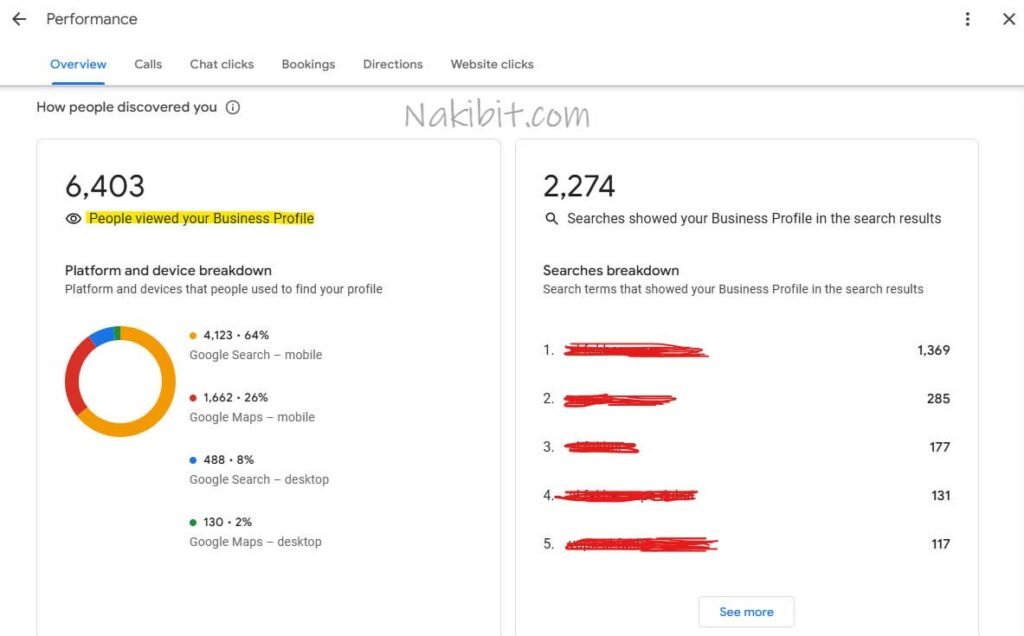 Local SEO
Mobile tyre fitting, Liverpool, UK
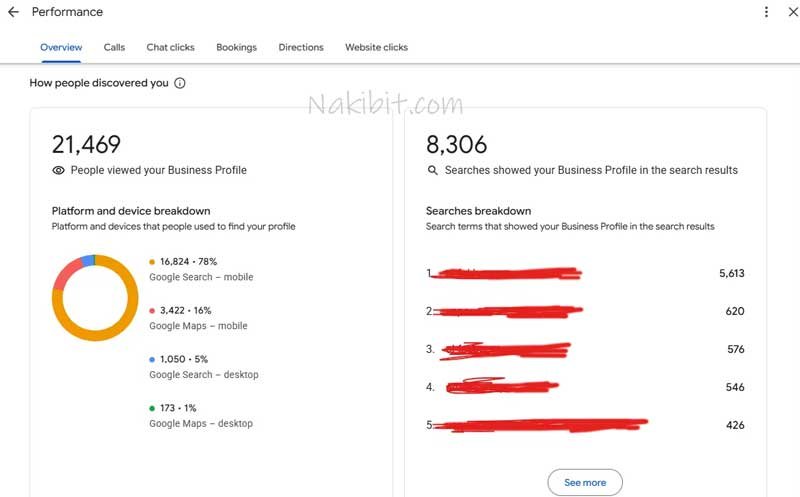 Local SEO
Cleaning services, Melbourne, Australia
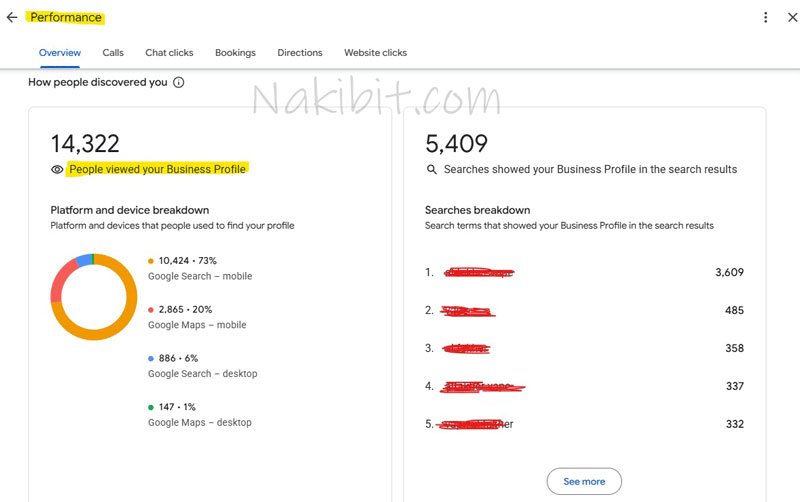 Local SEO
Plumbing, California, USA
Each branch needs a strong Google Business Profile, steady review management, accurate local citations and clear local landing pages. The overview is on my local SEO services page. For ongoing support across all your branches, see my monthly SEO packages.

Send me your list of locations. I will check a few and tell you what I find.
No obligation · Reply from Nazirul Islam Nakib himself
 Nazirul Islam Nakib
We usually reply in a few minutes
Leave your email or WhatsApp number and we'll follow up as soon as we're back online.